null
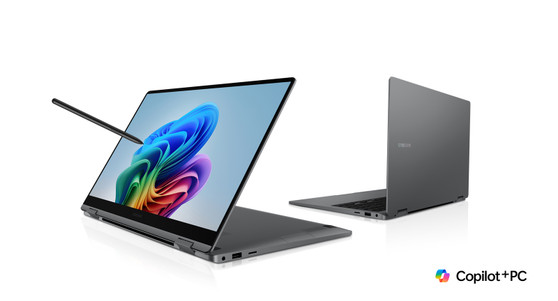
Samsung Galaxy Book5 360 NP750QHA-Ka1HK 15.6 16GB RAM/SSD 512GB Laptop

Samsung Galaxy Book5 360 NP750QHA-Ka1HK 15.6 16GB RAM/SSD 512GB Laptop

(No reviews yet) Write a Review
Now: ¥11,249.00
Was: ¥11,930.77
Shipping:
¥306.80 (Fixed Shipping Cost)
***Samsung Galaxy Book5 360 NP750QHA-Ka1HK 15.6 16GB RAM/SSD 512GB Laptop FedEx***
 
Free Fed-ex Shipping to USA,Canada,UK,Germany,Australia,Japan !!!
 
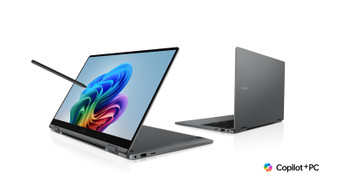
Galaxy AI. Galaxy Book5 360 in Gray is folded back, facing left with a black wallpaper onscreen and S pen touching the screen. Intel Core Ultra 7 and Intel Evo Edition logos are shown.

Features

 
Galaxy AI

Meet the best-in-class Galaxy Book5 360. This AI-powered PC packs a punch with the latest Intel® Core™ Ultra processor and an all-day battery1~5 — perfect for your next all-nighter.

See the Highlights

The grid of the chipset on Galaxy Book5 360 containing the CPU, GPU and NPU is shown.

Powerful processor


A smart watch shown onscreen on Galaxy Book5 360 is traced using AI Select and search results with relevant content appear on the screen.

Galaxy AI on PC


Galaxy Book5 360 is closed and set on the right side view. Up to 31 hours of battery life is supported.

All-day battery1~5


360˚ of potential

Galaxy Book5 360 bends to your will to fit your creative style. Its slim, lightweight build makes it easy to carry from classroom to library. Sketch on the go, develop your next big idea or unwind with entertainment — all on one versatile device.

Galaxy Book5 360 in Gray is folded almost all the way back with the screen facing left, a black wallpaper shown onscreen and S Pen touching the screen. The 15.6 inch Galaxy Book5 360 has thickness of 13.7mm and weighs 1.46kg. Galaxy Book5 360 in Gray is open, facing back left with the Samsung logo visible on the laptop cover. Galaxy Book5 360 in Gray is open, facing forward with a black wallpaper onscreen.
GRAY
Galaxy Book5 360 in Gray is folded almost all the way back with the screen facing left, a black wallpaper shown onscreen and S Pen touching the screen. The 15.6 inch Galaxy Book5 360 has thickness of 13.7mm and weighs 1.46kg. Galaxy Book5 360 in Gray is open, facing back left with the Samsung logo visible on the laptop cover. Galaxy Book5 360 in Gray is open, facing forward with a black wallpaper onscreen.

Powerful processor driving the Next-Gen AI PC

Experience a new level of transformative AI performance with the super-fast Intel® Core™ Ultra processor (Series 2), upgraded graphics and an advanced NPU capable of up to 47 TOPS. Harness all that power to blaze through heavy workloads, video editing and easily complete AI-intensive tasks with incredible speed.1

The grid of the chipset on Galaxy Book5 360 containing the CPU, GPU and NPU is shown. The NPU is capable of up to 47 TOPS. The CPU delivers up to 14 percent improved performance. The GPU delivers up to 158 percent improved performance. Intel Core Ultra 7 and Intel Evo Edition logos are shown.

Search is at your fingertips

Simply circle something you want to search and instantly receive search results. It's fast, easy, and doesn't require a bunch of new windows. S Pen and your finger are now able to search in ways you only dreamed about.


Rewind time with Recall

Need to find your old class notes? No worries. Recall has you covered — allowing you to explore your laptop's history. You can even re-engage with that moment in your PC's history. Simply explain what you can remember — an image, text, whatever —  and Recall will find that exact moment in time.


Upscale imagery the easy way, with AI

Retouch images and clean up blurry photos with Photo Remaster, powered by the advanced NPU on Galaxy Book5 360. The snappy tool uses a smart algorithm that gives all-new life to your snaps and makes every detail shine — just like magic.


Co-creator. Dream, doodle, transform


Need a custom image for a presentation? Use Cocreator in Paint — sketch your idea and watch as AI transforms it into artwork. Edit, regenerate and apply finishing touches using simple prompts.2

Real-time translation with Live Captions


Catch every word in conference calls with Live Captions. AI automatically detects speech in meetings and video streams and converts it into English captions in real time, helping you to stay in the know.3

Launch AI with one press


A single press is all it takes to launch Copilot — the dedicated key on the keyboard of Galaxy Book5 360 puts personalized AI assistance at your fingertips for instant access when you need it.4

Display

Galaxy Book5 360 is folded back with the screen facing forward, a colorful image is shown in full screen. DCI-P3 120% COLOR VOLUME. Eye Care Display logo. SGS Performance tested. OLED provided by Samsung. VESA CERTIFIED DisplayHDR logo. 500.

Super AMOLED. What a brilliant idea


From detailed presentations to vibrant content, it all looks sharp on the 15.6" Super AMOLED display. With vivid colors, fast response time and reduced blue light emission, this brilliant screen delivers a delightful viewing experience.5

Samsung Notes app is open onscreen on Galaxy Book5 360 and a person is tapping on the touchscreen using S pen to edit the content.

Tap into your potential


Galaxy Book5 360's touchscreen, compatible with S Pen, puts control at your fingertips. Navigate through apps and menus, sketch ideas, edit content and more using intuitive multi-touch gestures that enhance productivity and creativity at every touch — whether you're using your fingertips or the S Pen.6

Stay powered up from morning to night1~5

Charge once, stay productive all day with the long-lasting battery of Galaxy Book5 360, supporting up to 31 hours of video runtime. To power up, plug in the compact charger to get up to 39% in just about 30 minutes using fast charging.

Galaxy Book5 360 is closed and set on the right side view. Up to 31 hours of battery life is supported.

Surround yourself with Dolby Atmos audio

Tuned with Dolby Atmos, the speakers on Galaxy Book5 360 fill your space with rich, immersive sound. Whether you're catching up with studies, video chatting or tuning into your favorite music, enjoy dynamic audio that keeps you engaged from start to finish.

Galaxy Book5 360 is open, facing forward with a person shown dancing in full screen and sound waves coming out of the laptop speakers. Dolby Atmos logo is shown.

Plug and play

Galaxy Book5 360 is equipped with a wide range of ports. Hook up essential devices to your workstation with ease using the two built-in Thunderbolt 4 ports, HDMI, USB-A, microSD card slot and Headphone/Mic.7

Two Galaxy Book5 360 devices in gray are set on the left and right side view to highlight the port layout. Ports are labeled Micro SD. USB 3.2 TYPE-A. 3.5PI HP/MIC. HDMI. THUNDERBOLT 4.

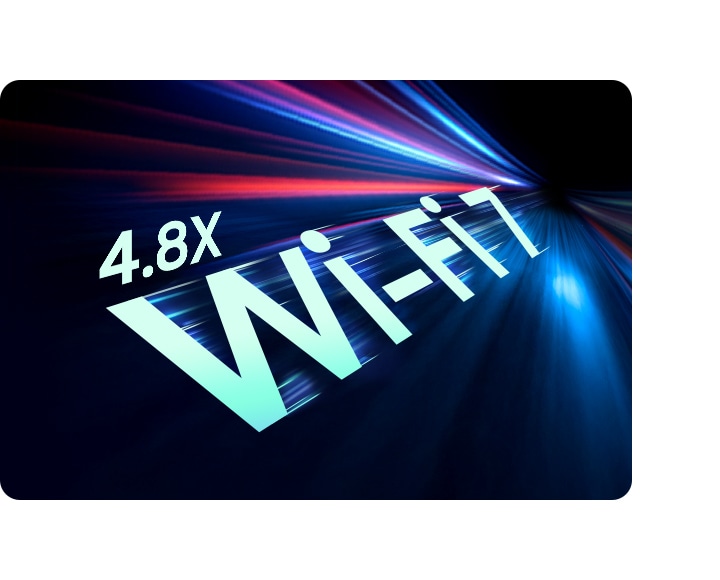
Wi-Fi 7. Full speed ahead

Go online, stay online — Wi-Fi 7 is up to 4.8x faster than Wi-Fi 6, letting you connect reliably with lightning speed. Join online meetings, share updates and stay in touch easily with smooth real-time interactions and ultra-low latency.8

 
Big Wi-Fi 7 letters with the number 4.8X and blurry lines around are shown to highlight the faster speed compared with Wi-Fi 6 and Wi-Fi 6E.

The connected power of Galaxy

An image of a building, selected on the screen of Galaxy S24 Ultra, is shared via Quick Share to Galaxy Book5 360 and open in full screen. Quick Share icon shown.

Quick Share. Swift, safe transfers


Sharing pics, docs and massive files between Samsung Galaxy devices is a breeze with Quick Share. Connect devices via direct wireless pairing for instant transfers, even if it's something sensitive — the private sharing feature encrypts your data with blockchain technology for safekeeping.9

Galaxy S24 Ultra and Galaxy Book5 360 are placed next to each other. Images selected on the screen of Galaxy S24 Ultra are copied to a folder on Galaxy Book5 Pro using Multi Control to operate both devices.

Multiple devices, unified control


With Multi Control, multitask seamlessly across Samsung devices using your PC's keyboard with a mouse. Navigate through menus, access files and data, copy and paste content easily between your laptop and your smartphone, Galaxy Tab, Samsung TV or Smart monitor.10

A webpage and a note in Samsung Notes app are open on Galaxy Book5 360 and the screen is extended on Galaxy Tab S10 Ultra in Landscape mode to highlight the dual-monitor experience with Second Screen.

Bring along your Tab as a Second Screen


Double your workspace by connecting Galaxy Tab as an additional display to your PC. Link the devices with just a click on your laptop, then take advantage of the extra space on Galaxy Tab with Extension, Duplicate and Rotation modes to rearrange your view.11

Galaxy S24 Ultra is connected to Galaxy Book5 360 through the Phone Link app. The onscreen content on Galaxy S24 Ultra is accessed directly on Galaxy Book5 360 and an image is copied and pasted onto a presentation file open on the laptop's screen.

Access your mobile world on PC


Connect your smartphone to your PC via Phone Link to access recently viewed webpages or launch up to 5 mobile apps right from your laptop. Use smart AI features from your Galaxy smartphone and get an expanded view on the big screen of Galaxy Book5 360.12

Explore Galaxy Book5 Series

Galaxy Book5 Pro 360

Galaxy Book5 Pro 360


Galaxy Book5 Pro

Galaxy Book5 Pro


Frequently Asked Questions

Does Galaxy Book5 360 support S Pen?

Galaxy Book5 360 supports S Pen and it comes included in the box. Use the precise S Pen to sketch your ideas, elevate your note-taking and fine-tune details in your projects.13

What processor does Galaxy Book5 360 have?

Galaxy Book5 360 is a convertible laptop with a powerful processor delivering incredible next-gen AI PC performance for your daily needs or academic pursuits. Speed through heavy workloads, video editing, AI-intensive tasks and more with ease.Galaxy Book5 360 is equipped with an Intel® Core™ Ultra processor (Series 2) and features an NPU capable of up to 47 TOPS, a CPU with up to 14% and GPU with up to 158% improved performance when compared with Galaxy Book4 360.14

What AI features does Galaxy Book5 360 have?

Galaxy Book5 360 supports intelligent Copilot+ PC and Galaxy AI features, enhancing your daily productivity and creativity.Use Galaxy AI features such as AI Select to instantly get search results for text, images and QR codes using S Pen, the cursor or your fingertips. With Photo Remaster, upscale and retouch your photos with ease.Copilot+ PC features provide personalized AI assistance. Use Recall to look through past task history on your PC, Live Captions to get real-time translation, or Cocreator in Paint to transform your bright ideas into works of art.15

Does Galaxy Book5 360 have a touchscreen?

Galaxy Book5 360 features a 15.6" high-resolution Super AMOLED touchscreen. Thanks to the 2-in-1 convertible design, the expansive screen can rotate up to 360°, so you can flip it as you wish and tap into your potential.16

What is the battery life of Galaxy Book5 360?

Galaxy Book5 360 is a laptop supporting long-lasting battery life, so you can stay productive for as long as you need.Galaxy Book5 360 supports up to 31 hours of video runtime.If you run low on battery, don't worry. Galaxy Book5 360 supports fast charging — simply plug in and get up to 39% charge in just about 30 minutes.17


Specifications

  • Windows 11 Home

  • Intel® Core™ Ultra 7 Processor 256V (P-core Up to 4.8 GHz 12 MB LLC Cache)

  • Intel® Arc™ 140V GPU (8GB)

  • Intel® AI Boost

  • 15.6" FHD AMOLED Display (1920 x 1080), Touch Screen Panel, S Pen Support

  • 16 GB LPDDR5X Memory (On Package)

  • 1 TB NVMe SSD
    Number of SSD Slots : 2

  • None

  • Gray

  • Stereo Speakers ( 2 W x 2 )
    Dolby Atmos®
    Internal Dual Array Digital Mic
    1080p FHD Camera

  • Bluetooth v5.4
    Wi-Fi 7, 802.11 be 2x2

  • 1 HDMI
    2 Thunderbolt™ 4
    1 USB3.2
    MicroSD Multi-media Card Reader
    1 Headphone out/Mic-in Combo

  • Pro keyboard with Numeric key
    (Backlit keyboard)
    Touch screen
    Clickpad
    S Pen

  • TPM, FingerPrint Reader

  • 68.1 Wh (Typical)
    65 W USB Type-C Adapter

  • 355.4 x 228.0 x 13.7 mm (13.99" x 8.98" x 0.54")

  • 1.46 kg (3.22 lbs)

  • Galaxy Book Experience
    Multi Control
    Second Screen
    Samsung Notes
    Samsung Gallery
    Quick Share
    Samsung Account
    Samsung Settings
    AI Select
    SmartThings
    Quick Search
    Samsung Device Care
    Screen Recorder
    Live Wallpaper
    Bixby
    Samsung Find
    Samsung Flow
    Samsung Studio
    Phone
    Galaxy Book Smart Switch
    Samsung Pass
    Air Command
    PENUP